Slowing a song down on a phone without making Celine Dion sound like Leonard Cohen is a solved problem. A dozen apps on each store will do it, and most of the "best app to slow down music" lists stop there, ranked by star rating. The questions you run into on day two are the ones those lists skip: why the song you want will not open, what the free version lets you do before it asks for money, and whether the loop you set up yesterday is still there today.
This guide answers those. It covers the apps worth installing on iPhone and Android, what each costs and how, what the built-in options already on your phone can do, and how to get a song onto the phone in the first place. I build PracticeSession, which is one of the apps below, so weigh my conclusions accordingly. I have tried to be fair to every app here, which means saying plainly where another one is the better pick, and also saying plainly where mine is.
The short answer
- PracticeSession (iPhone and Android): a free version that does more than several of the paid apps here, with no ads and no song, loop or time limits; high-quality cloud stem separation; a one-time Pro that turns it into a full practice and gigging workspace; and the only app we checked that keeps one library in step between your phone and a Windows, Mac or Linux computer.
- Up Tempo (iPhone and Android): the pick if you want to separate instruments on the phone itself for free or nearly free, with a cheap one-time Pro.
- Moises (iPhone and Android): convenient cloud stems by subscription, online only, with a tight free tier.
- Anytune (iPhone and Android): polished on iPhone, a different feature set and pricing on Android.
- Capo and Transcribe+ (iPhone only): chord detection and fine transcription tools, no Android version.
- Amazing Slow Downer (iPhone and Android): the app that defined the category, still sold as a one-time purchase, and in 2026 outdone by newer options at the same price.
If all you need is to hear one passage at 75% once, you may not need an app at all. The built-in options come first.
Can you slow down a song with what is already on your phone?
Sometimes. The trouble is that the apps most people play music in are the ones that cannot do it.
- YouTube has a playback speed control from 0.25x to 2x, in 0.05 steps, and it keeps the pitch. The stretch itself is rough once you go much below 75%, with the smeared, watery sound that cheap time-stretching produces. The bigger frustration is navigation: YouTube is built for watching, not for practicing, so there is no precise way to land on the bar you want, no marker to come back to, and the only loop is the whole video. If you need one slower listen to a song that lives on YouTube, it will do. Practicing with it means scrubbing a progress bar with your thumb, over and over.
- Spotify has no speed control for songs, only for podcasts and audiobooks. Apple Music has none at all.
- VLC is free on both platforms. On Android it plays from 0.25x to 4x, has an A-B repeat, and keeps the pitch when its time-stretching audio setting is switched on. It plays files, so it has the same "where does the song come from" problem as every app below.
- Voice recorders on some phones have a playback speed option, useful for a lesson you recorded, not for learning a record.
What none of these do is give you tools for the actual work: landing exactly on a passage, looping bar 17 to bar 20, nudging the loop edges, and finding it all there tomorrow at the tempo you left it. That is where a practice app earns its place.
Before you pick an app: where your songs come from
This is the wall almost everyone hits in the first ten minutes, and almost no roundup mentions it.
Why Spotify and Apple Music songs will not open
A song you stream from Spotify, Apple Music, YouTube Music or Amazon Music is not a file you own. The copies these services keep for offline listening are encrypted and can only be played inside their own app. Apple's developer documentation marks such tracks as protected, and a third-party app receives no audio for them. Spotify and YouTube both state that their downloads are encrypted, and their terms forbid recording or ripping them. No slow-down app can legitimately open them, whatever its store listing implies.
There are partial exceptions, and they are worth understanding:
- On iPhone, songs you own in your Music library (iTunes Store purchases, CDs you imported on a computer) are not protected, and apps that read the Music library can open them. Apple Music subscription tracks added to the same library cannot be opened.
- A few apps control the Apple Music player itself and slow it down. They never receive the audio, so they cannot change the key, mark a region precisely or separate instruments.
- On Android, a few apps advertise integration with streaming services. Android's own system for capturing another app's audio lets apps opt out, and Spotify does, so a screen recording of Spotify is silent.
Three routes that do work
1. Put the file on the phone. On iPhone, anything in the Files app is reachable: iCloud Drive, Dropbox, Google Drive and OneDrive all appear there, and AirDrop from a Mac drops a file straight in. Finder file sharing over a cable works too. On Android, copy files over USB in File Transfer mode, send them with Quick Share, or open them from a cloud drive. Music you buy as a download (Bandcamp is the obvious source, and the money reaches the artist) arrives as ordinary files that every app here can open. On iPhone, Bandcamp's downloads land as a zip you open in the Files app.
2. Record it. Every phone can record a lesson, a rehearsal or a teacher playing the part. Most practice apps, PracticeSession included, open a recording like any other file.
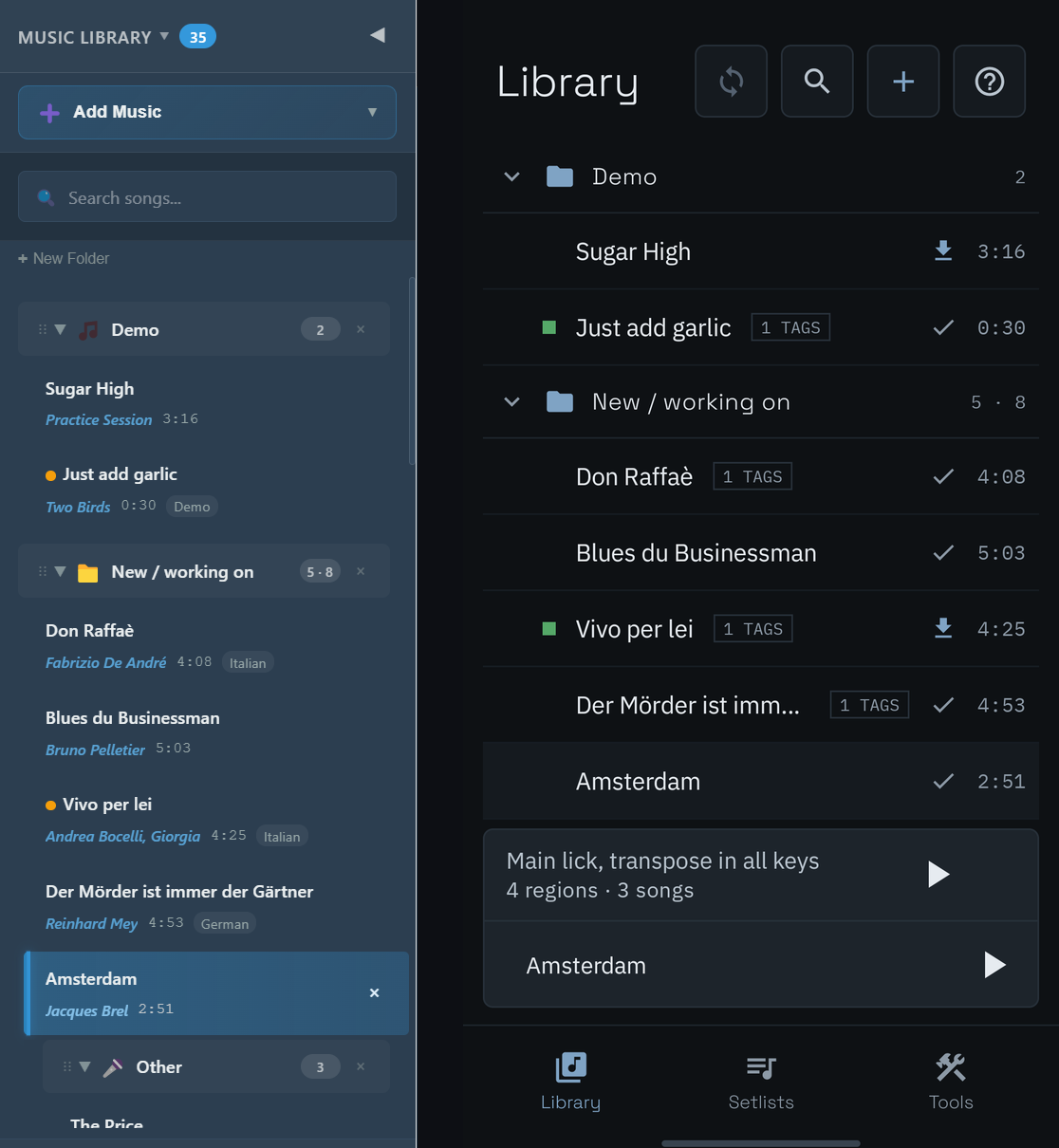
3. Build the library on a computer and sync it. Managing audio files is easier on a computer, and if your practice app has a desktop version with a real library, the phone can simply show you that library. In PracticeSession you can see your entire desktop library on the phone and download the audio only for the songs you are about to practice, one at a time or a whole setlist at once. A large library on the computer does not fill the phone. More on sync below, because it turns out to be rare.
The apps compared
Prices below were read on the US App Store and Google Play on September 25, 2026. Stores set local prices elsewhere, and prices in this category move, so treat them as a snapshot. Where a store does not show an in-app price, I describe the model rather than guess.
| App | iPhone | Android | Paid version | What the free version really does | Stems | One library across devices? |
|---|---|---|---|---|---|---|
| PracticeSession | Yes | Yes | One-time Pro, $22.99 at the time of writing | Whole songs, unlimited regions and loops, stems playback, tuner, notes. No ads, no account, no song or time limits | Cloud, high quality, paid per minute with credits | Yes: iPhone, Android, Windows, Mac, Linux |
| Amazing Slow Downer | Yes | Yes | One-time: $14.99 iPhone, $9.95 Android | Lite plays only the first quarter of each song | No | No |
| Up Tempo | Yes | Yes | One-time Pro, $9.99 on iPhone | Whole songs, 6 saved loops | On the phone, Pro | No (settings file export) |
| Anytune | Yes | Yes | iPhone: packs and Pro+ $14.99. Android: subscription, or a time-limited one-time option | Core features, with ads | Android only, cloud, credits, account | Apple devices only (iCloud) |
| Music Speed Changer | Yes | Yes | iPhone Pro $14.99 lifetime or $0.99/month | Android: full player, with ads | On the phone (iPhone) | No |
| AudioStretch | Yes | Yes (by BandLab) | iPhone $9.99 one-time. Android free with in-app purchases | iPhone: a Lite version. Android: free app | No | No |
| Moises | Yes | Yes | Subscription: $5.99/month or $39.99/year | 5 songs a month, 5 minutes each, speed within 10 BPM, pitch within 2 semitones | Cloud, the core of the product | Songs and setlists yes; speed and key changes no |
| Capo | Yes | No | Subscription: $19.99/year ($49.99/year to include the Mac) | Works, but loops, markers and chords are not saved | On the phone | Apple devices only, with subscription |
| Transcribe+ | Yes | No | $9.99/month, $39.99/year, or a lifetime unlock | Free download; the main features need the subscription or lifetime unlock | On the phone | Apple devices only (iCloud) |
PracticeSession: a free slow-downer with no catches, and a one-time Pro that becomes a practice workspace
Mine first, so you know what the others are being measured against. It is on Google Play and the App Store, and on Windows, Mac and Linux.
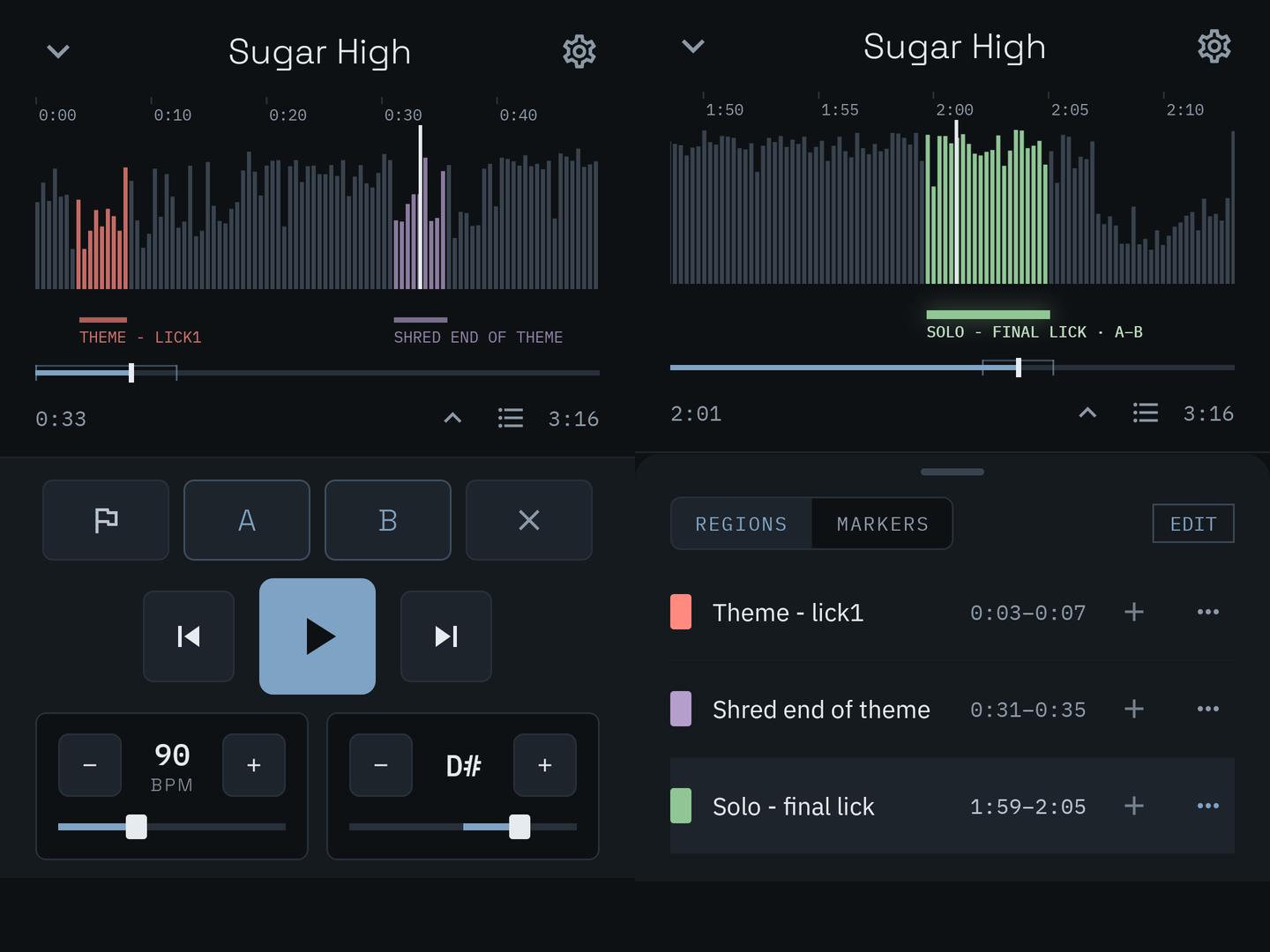
The free version is a complete slow-downer, not a demo. Import any common audio file, change speed (0.2x to 4x) and pitch (12 semitones each way) independently, zoom into the waveform, mark a passage with an A and a B button and loop it with one tap. Regions, markers, tempo and key are saved with the song as you go, with no cap on how many. Songs separated into stems play as parts you can mute or solo. There is a chromatic tuner, notes and a checklist per song, and background playback with the lock screen stepping through your marked passages. No ads, no account, no limit on songs, loops or minutes, and everything works offline. Set that against the free tiers in the table: a quarter of each song, six loops, five songs a month, or ads. The audio engine is Signalsmith Stretch, the same one the desktop app uses, which I wrote about in a deep dive on how modern pitch-shifting works.
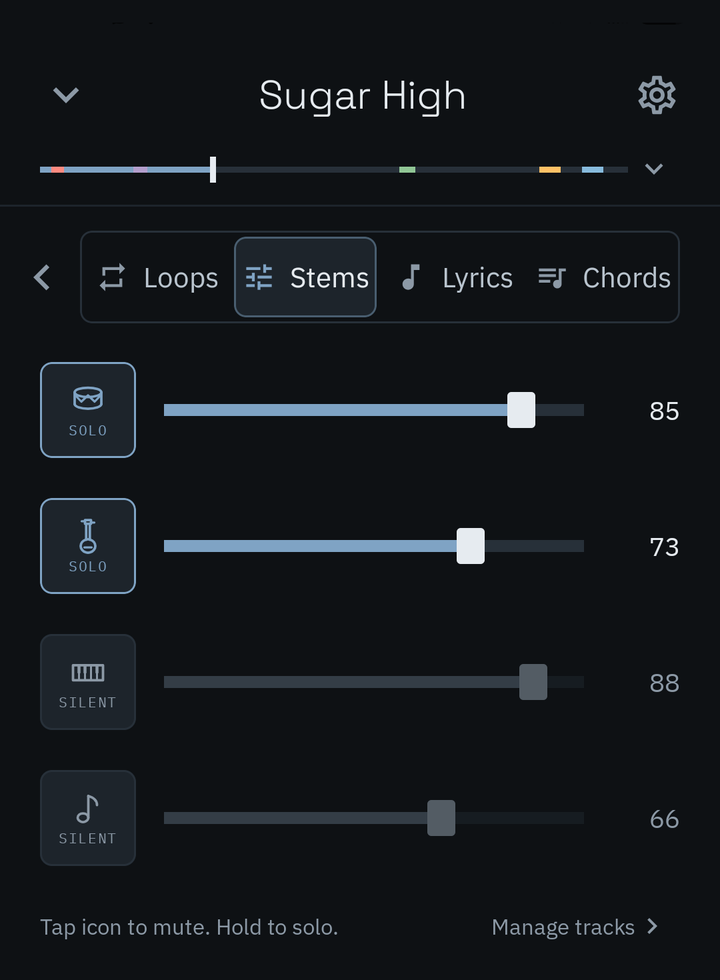
Stem separation is cloud-based and high quality. Pick two, four or six parts, or isolate one instrument of nine against the rest, with options to strip reverb and split lead from backing vocals. It is paid per minute of audio with credits ($3.99 for 20 minutes, up to $15.99 for 150), from the free version, with no subscription. The result lands in the song, in sync with your regions and loops. What the phone does not do is separate on the device itself: Up Tempo, Capo and Transcribe+ do, with smaller models, and the section on Up Tempo says when that is the right trade.
Pro is a one-time unlock, $22.99 at the time of writing, and it turns the slow-downer into a practice and gigging workspace: loop sequences that run speed training and key changes for you, a timed practice session across several songs with a cue when time is up, lyrics that follow the recording, chord charts you can read in any key and capo, and setlists you can build and run on stage with the words and chords in front of you. A 14-day trial opens everything with no account and nothing to cancel. When it ends, anything you typed into lyrics or chord charts stays readable, because that is your work, not a feature.
For the record: pitch moves in whole semitones on the phone, and there is no video playback. Both are in the desktop app.
Amazing Slow Downer: the one that started it, and the one to outgrow
Roni Music's Amazing Slow Downer has been around longer than smartphones, and on bass and guitar forums it is still the app people name first, mostly because it has kept working for them for ten years or more and because it has always sounded good at low speeds. It changes speed from 25% to 200% without changing pitch, changes key, and loops a passage. It is a one-time purchase, and the Android version is cheaper than the iPhone one ($9.95 against $14.99). The free Lite version plays only the first quarter of each song, which is enough to judge the sound and not enough to learn anything.
It deserves its reputation, and I want to be fair to it: it was an early player, it does what it does well, and it built its name over many years. It is also, in 2026, a very simple app. It slows, loops and shifts, and that is the whole of it: no stem separation, no notes, no chord charts, no library beyond a list of files, and its Spotify support ended in 2022 (some articles still say otherwise). On iPhone it can play Apple Music tracks from your library, but with pitch change switched off. The iPhone, Android, Mac and Windows versions are separate purchases with no shared library, a point Mac App Store reviewers raise themselves. The core job it does is now done at least as well by newer apps that do a great deal more, several of them for free. At $9.95 to $14.99 it is not a bad purchase, but it is no longer the obvious one.
Up Tempo: on-device stems at a small one-time price
Stonekick's Up Tempo is one of the most reviewed apps on this list (more than 18,000 ratings on Google Play) and one of the most recently updated on both stores. It changes speed and pitch, loops, saves up to six loops in the free version, and removes or isolates instruments on the phone itself in Pro, with no account and no internet connection needed. Pro is a one-time $9.99 on iPhone.
Two things to weigh. Everything in Up Tempo's description apart from on-device separation (speed, pitch, loops, saved loops) is in PracticeSession's free version without the six-loop cap. And on-device separation on a phone runs a smaller model than the cloud services do, which is the trade: no cost per song and no connection needed, against cleaner stems. If you want to pull the bass out of a song now and then and are not fussy about bleed, Up Tempo's Pro is a good buy. If the stems have to be clean, Moises or PracticeSession's cloud separation is the step up.
Anytune: polished on iPhone, a different app on Android
Anytune is well liked on iPhone, where it handles markers and loops well and keeps them in sync across your iPhone, iPad and Mac through iCloud (the Mac app is a separate purchase). The free iPhone app shows ads; the paid features come as packs or as the separate Pro+ app at $14.99.
Anytune does exist on Android, which older roundups sometimes miss, but it is a separate product that the developer describes as still working toward parity with the Apple version. Android Pro is sold mainly as a subscription, with a one-time option offered for a limited time. Its AI stem separation (Demix) is Android-only, runs in the cloud, is paid in credits and needs an Anytune account. The Android app does not share the iCloud library.
Music Speed Changer: the most installed, with ads
Music Speed Changer has more than ten million installs on Android, a wide speed range (15% to 500%) and pitch shifting of 24 semitones each way. The Android version is free and shows ads, which is the most common complaint about it. On iPhone it now sells a Pro version at $14.99 lifetime or $0.99 a month, and separates stems on the phone.
AudioStretch: two companies, two different apps
AudioStretch has the widest range here: from ten times slower to ten times faster, including freezing the sound at a single point, and 36 semitones of pitch shift with fine tuning in cents. On iPhone it is a $9.99 one-time app by Cognosonic, last updated in October 2024. On Android it is published by BandLab, free with in-app purchases, without the iPhone version's video playback. The same tool is also built into the free BandLab app. It has no stem separation of its own.
Moises: stems first, by subscription
Moises is built around separating a song into parts in the cloud, and it does that conveniently, with speed, key and chord features on top. Your uploaded songs, stems and setlists follow your account across the web, desktop, iPhone and Android, which is more than most apps here offer. Its own help centre says your speed and key changes are not synced between devices, and that the app cannot be used offline. The free tier is tight (five songs a month, five minutes each, speed within 10 BPM and pitch within 2 semitones). Premium is $5.99 a month or $39.99 a year, and its billing draws more complaints in 2025 and 2026 reviews than anything else in this category.
Capo and Transcribe+: strong on iPhone, not on Android
Capo detects chords from the audio and separates instruments on the device, and slows from 25% to 150%. The download is free, but nothing you set up (loops, markers, chords) is saved without a subscription: $19.99 a year for the iPhone and iPad, or $49.99 a year to add the Mac. Its developer states it has no plans for Android or Windows.
Transcribe+ offers fine pitch control (in hundredths of a semitone), on-device stems and loops that sync through iCloud across iPhone, iPad and Apple-silicon Macs. It costs $9.99 a month, $39.99 a year, or a lifetime unlock. Despite the name, it has no connection to Seventh String's desktop Transcribe!, which has no mobile version.
If you are on Android and were sent to either of these by a forum thread, the closest equivalents are Up Tempo for on-device stems and Anytune for markers and loops.
One practice setup on your phone and your computer
This was the most surprising result of the research for this article. Of the dedicated slow-down apps we checked, none keeps one practice library in step between an Android phone and a computer, or between an iPhone and a Windows PC.
- Apple devices only: Anytune, Capo and Transcribe+ sync through iCloud between iPhone, iPad and Mac. Capo needs a subscription for it, and Anytune syncs your loops and markers but expects the song to be on each device.
- No sync at all: Amazing Slow Downer, Up Tempo, Music Speed Changer and AudioStretch. Your loops live on the phone you made them on.
- Across platforms, partly: Moises syncs songs, stems and setlists everywhere, but not your speed and key changes.
Why it matters: most people who practice seriously end up doing it in two places, at a computer where it is easy to manage files and see a big waveform, and on a phone on the bus, in the rehearsal room or at a lesson. Without sync you build the practice setup twice, and the two copies drift apart. The loop you tightened on the phone is not on the computer, and the chord you corrected at the desk is wrong on stage.
PracticeSession runs on Windows, Mac and Linux as well as iPhone and Android, and a library is the same thing on all of them. Build it on the computer, where adding files is easy, then join it on the phone: every song arrives with its regions, loops, notes, lyrics, chord charts and setlists. The phone shows the whole library, and you download the audio only for the songs you need. Edit on either side and the other side follows.
Sync is off until you switch it on. Nothing is uploaded from your computer without your say-so, and the app works fully without an account. That was a deliberate choice: your library is yours, and sharing it with your own devices should be your decision. When you do turn it on, you sign in with an email code, and audio travels through your account's storage: 500 MB is included, and Sync Plus raises it to 15 GB for $9.99 a year. The desktop app ($39 one-time) and mobile Pro are separate purchases, and joining a synced library works in the free mobile app.
How to slow down a song on iPhone
- Get the song into the Files app. Save it from iCloud Drive, Dropbox or Google Drive, AirDrop it from a Mac, or download a purchased file. (Apple Music and Spotify tracks will not work, for the reasons above.)
- Open it in your practice app. In most apps this is an import or "+" button that opens the Files picker. You can also use Share from the Files app and choose the app.
- Set the speed. Start around 70% to 80% for a passage just beyond your reach. Going straight to 50% is usually slower than you need.
- Mark the passage and loop it. Set the start and end around the part you are learning, a little wider than the hard bit, so you have a run-up.
- Raise the speed as it settles. Small steps. Our article on why slow practice works covers how fast to climb.
How to slow down a song on Android
- Get the song onto the phone. Copy it over USB (choose File Transfer when you plug in), send it with Quick Share, or save it from Google Drive into your Downloads or Music folder.
- Open it in your practice app through its import button, which opens Android's file picker. Some apps also scan the Music folder for you.
- Set the speed, mark the passage, loop it, and raise the speed as it settles, exactly as on iPhone.
- Check background playback. If you want to practice with the screen off, make sure the app keeps playing and gives you controls on the lock screen. Not every app does.
If the song is already in a desktop library, skip the first step on either phone: join the library and download that one song.
What slowing down does to the sound
Every app here keeps the pitch when it slows down, and every one of them pays for it somewhere. Slowing audio means inventing time that was not in the recording, and the algorithm decides whether you hear a clean, slower performance or a smeared, phasey one. Drums and fast guitar lines are where the differences show, usually below about 60%.
Forum users are consistent about one thing: Amazing Slow Downer has held up well at low speeds for a long time, and the apps built on current engines are at least its equal. My advice is to try the free version of any app you are considering on the fastest passage you are learning, at the slowest speed you use, before you pay for it.
Which one should you get?
For most people: PracticeSession. Its free version does what the paid versions of several apps here do, with no ads and no song, loop or time limits, so there is no catch to discover on day three. When you need stems, the cloud separation is the clean kind and you pay only for the minutes you separate. And if you ever want more than a slow-downer, a one-time Pro adds scheduled practice sessions, lyrics and chord charts, setlists and a stage runner, with the same library on your computer if you use one.
If you want to separate instruments on the phone itself, free or nearly free: Up Tempo. On-device stems with no per-song cost, and a cheap one-time Pro. For cleaner stems, step up to Moises or PracticeSession.
If stems are the whole point and a subscription does not bother you: Moises. Read the billing terms first, and know that it does not work offline.
If you are on iPhone and want chord detection from the audio: Capo, knowing that saving your work needs the subscription.
If you have used Amazing Slow Downer for years and it still does what you need: keep it. There is no reason to switch an app that works. But I would not buy it today, because for the same money or less, the apps above do the same job and a great deal more.
Your practice library, on your phone
PracticeSession is free on iPhone and Android: slow down, change key, mark and loop as many passages as you like, play stems and tune up, with no ads, no account and no limits. Pro is a one-time unlock, with a 14-day trial, that adds practice sessions, lyrics, chord charts and setlists. Already on the desktop app? Sign in with the same email and your library follows you.
Get it on Google Play Download on the App Store
Practicing at a computer too? PracticeSession for Windows, Mac and Linux uses the same library.
Every competitor figure on this page was read on the US App Store, Google Play or the vendor's own site on September 25, 2026, and is dated here so you can tell when it goes stale. If something here is wrong or out of date, tell me and I will fix it.
Frequently Asked Questions
Can I slow down a Spotify or Apple Music song?
Not in a practice app. Songs streamed from Spotify, Apple Music, YouTube Music and Amazon Music are encrypted and can only be played inside their own apps, so no slow-down app can open them. Spotify and Apple Music have no speed control for songs either. What works is a file you own: a purchased download, a CD you imported, or your own recording. On YouTube, the built-in playback speed control goes from 0.25x to 2x.
What is the best free app to slow down music?
PracticeSession's free version is the most complete: whole songs, independent speed and pitch, unlimited saved regions and loops, stems playback and a tuner, with no ads, no account and no limits on songs or minutes. Up Tempo's free version is good but caps you at six saved loops. Music Speed Changer is free on Android with ads. Amazing Slow Downer Lite plays only the first quarter of each song. YouTube and VLC cost nothing and slow audio down without changing pitch, but give you no way to mark or save a passage.
Is Amazing Slow Downer available on Android?
Yes. Amazing Slow Downer is on Google Play as a one-time purchase of $9.95, cheaper than the $14.99 iPhone version, with a free Lite version that plays the first quarter of each song. The Android, iPhone, Mac and Windows versions are separate purchases and do not share a library.
Is Anytune or Capo available for Android?
Anytune is on Android, as a separate app from the iPhone version, with Pro sold mainly as a subscription and cloud stem separation paid in credits. Capo is not: its developer says there are no plans for Android. Transcribe+ and OnSong are also Apple-only.
Does slowing down a song reduce the quality?
Some. Keeping the pitch while slowing down means the app has to stretch the sound, and every algorithm leaves traces, most audible on drums and fast lines below about 60% speed. Newer engines handle this better than older ones. Try the free version of an app on your hardest passage at your slowest speed before buying.
Which apps sync loops between my phone and my computer?
On Apple devices, Anytune, Capo and Transcribe+ sync through iCloud, Capo only with a subscription. Moises syncs songs and setlists across platforms but not speed and key changes. PracticeSession syncs the whole library, including regions, loops, notes, lyrics, chord charts and setlists, between iPhone, Android, Windows, Mac and Linux. Sync is optional and off until you turn it on.
Do these apps work offline?
Most do, once the song is on the phone: Amazing Slow Downer, Up Tempo, Capo, AudioStretch and PracticeSession all play and loop without a connection. Moises states that it cannot be used offline. Cloud stem separation, in any app that offers it, needs a connection while the song is being separated.