
If you're shopping for desktop music practice software and you refuse to pay another subscription, you've probably narrowed things down to a short list, and Song Master by Aurally Sound is likely on it. It should be: it's a capable app with an impressive analysis engine, and its maker shipped a major update, Song Master 5, in July 2026.
The closest alternative on that short list, and the one I'm comparing it against here, is PracticeSession. I build PracticeSession, so I have an obvious interest in your answer. I also think these two apps are different enough that an honest comparison helps you more than a sales pitch would. They overlap on the basics (slow down, loop, isolate instruments, train through keys), but their centers of gravity sit in different places. Depending on what you actually do at your instrument, the right answer might be Song Master, PracticeSession, or genuinely both.
The Short Answer
Song Master is an analysis and transcription engine. Its superpower is that you drop in a song and it tells you what's in it: chords, key, tempo, bar lines, song sections, all detected automatically by machine learning and presented on editable tracks. Song Master Pro 5 goes further, converting isolated stems to MIDI and exporting notation. If your core activity is figuring out songs, Song Master automates a real chunk of that work.
PracticeSession is a practice workflow. It doesn't detect chords from audio (that engine is in development), though it gives you several other ways to get chords into a song and a lot of control over them once they're there. What it's built around is everything that happens across the days and weeks after you've figured a song out: practice regions with their own speed and pitch settings that persist forever; loop sequences that chain those regions together; timed, structured practice sessions across your whole library; chord charts and synced lyrics you can edit, transpose, and export; setlists that turn that same library into gig materials; and cloud sync so it all follows you between machines.
One analyzes songs. The other organizes your practice life. With that frame in place, the details below will make sense.
Feature Comparison Table
| Feature | PracticeSession | Song Master 5 |
|---|---|---|
| Platforms | Windows, Mac, Linux, plus Android and iPhone | Windows, Mac |
| Price | $39 one-time (introductory) | $79.95 (Standard) / $139.95 (Pro), one-time |
| Trial | 14 days, all features | Unlimited, but 15-minute sessions, no saving |
| Update policy | Free 1.x updates; discounted 2.0 planned | v5 (July 2026) is the first paid upgrade |
| Automatic chord / beat / key / section detection | No (in development) | Yes, ML-based, editable |
| Chord charts you write and control | Yes (type them, or import ChordPro and Ultimate Guitar charts; chord, degree, and Nashville views; instant transposition; chords in setlist exports) | Yes (detected then edited; Song Sheet export is Pro only) |
| Audio-to-MIDI transcription | No | Yes (Pro, "Prism" engine + MIDI editor) |
| Notation displayed in sync with audio | Yes (Guitar Pro, MusicXML, synced cursor + bar grid) | No (Pro exports MusicXML/PDF for other apps instead) |
| AI stem separation | Local free and unlimited (2 or 4 stems); higher-quality cloud on credits (4 or 6 stems, or isolate any of 9 instruments); full song or just a selection | Local only ("Trident"): 4 stems, 6 with Pro; full song |
| Multi-track mixer | Yes | Yes |
| Synced lyrics | Yes (online search, sections become regions) | Yes (auto-download, LRC import/export) |
| Speed trainer | Yes (Speed Trainer) | Yes (Phrase Trainer) |
| 12-key training | Yes (Key Acrobat) | Yes (Key Trainer) |
| Per-region speed and pitch, saved per song | Yes | No |
| Loop sequences (chained regions) | Yes (Loop Manager) | No |
| Structured practice sessions | Yes (Practice Manager: queues, timers, recaps) | No (playlists only) |
| Setlists with gig exports | Yes (HTML viewer, PDF, print) | No (playlists; Pro adds MIDI/OSC rig control) |
| Cloud sync across devices | Yes (500 MB free; 15 GB $9.99/yr) | No (manual project folders) |
| Interactive in-app tutorials | Yes | No (external videos and docs) |
Where Song Master Is Genuinely Better
The analysis engine
This is Song Master's crown jewel, and I won't pretend otherwise. Load a song and it detects the chords (including slash chords and extensions), the key, the tempo, the bar lines, and even the song structure (intro, verse, chorus), and lays them out on editable tracks. Users who've been through Transcribe!, Riffstation, and Chordify consistently rank Song Master's detection at or near the top for desktop software. One long-time TalkBass user put it plainly: "The program's precision for these tasks is really impressive, far superior to any piece of music software I've tried before."
It isn't magic, and the fans are the first to say so. Users note that the chord analysis is a first draft you review rather than gospel (half-diminished chords and dense sections trip it up, and section detection "has to be revisited"). As a starting point that saves an hour of grunt work per song, though, it's real, and PracticeSession has no audio-analysis equivalent today. Chord detection is in development on our side; until it ships, if you want a machine to take the first listen for you, Song Master wins this category outright.
Chords and chord detection are not the same subject, however, and the two apps come at them from opposite ends. Song Master starts from a machine's guess and asks you to correct it. PracticeSession starts from a chart you already trust and hands you the tools to build, fix, and reuse it. More on that side of the ledger below.
Audio-to-MIDI and notation export (Pro)
Song Master Pro 5's headline feature is "Prism," which converts isolated stems to MIDI, feeding a built-in MIDI editor and exporting to MusicXML for MuseScore, Dorico, Finale, or Sibelius. For transcribers who want to go from recording to editable notation, this is a genuinely strong pipeline that nothing in PracticeSession replicates. The catch: it lives in the $139.95 Pro tier.
Everything runs locally
All of Song Master's processing, including stem separation, happens on your computer. No cloud, no credits, no account needed after activation. PracticeSession also includes free, unlimited local separation, but its highest-quality separation option is a cloud service with credit packs. If "never touches the internet" is a hard requirement and you want the best stems the app can make, Song Master's approach is cleaner. (Do check the hardware floor first: Song Master lists 16 GB of RAM as a minimum on both Windows and Mac, which is high for this category. It can also offload separation to an NVIDIA GPU, though the vendor labels that path unofficial and unsupported.)
Hands-free rig control (Pro)
Control in Song Master Pro runs both directions, and that's more interesting than it first sounds. A MIDI foot controller can drive the app (play and stop, jump to the next section, drop to half speed), while a Controllers Track on the timeline sends Program Change, Control Change, and OSC messages out to your gear at points you choose, so an amp modeller or a Gig Performer rackspace can switch itself at the top of the solo. The OSC reference goes further again: transport, tempo, playlist navigation, looping, and per-stem mute and solo. The users I found describe all this as a rehearsal-room rig rather than a stage rig, but if driving playback hands-free is central to how you practice, that's a real point in Pro's favor.
Where PracticeSession Is the Better Choice
Your songs remember everything
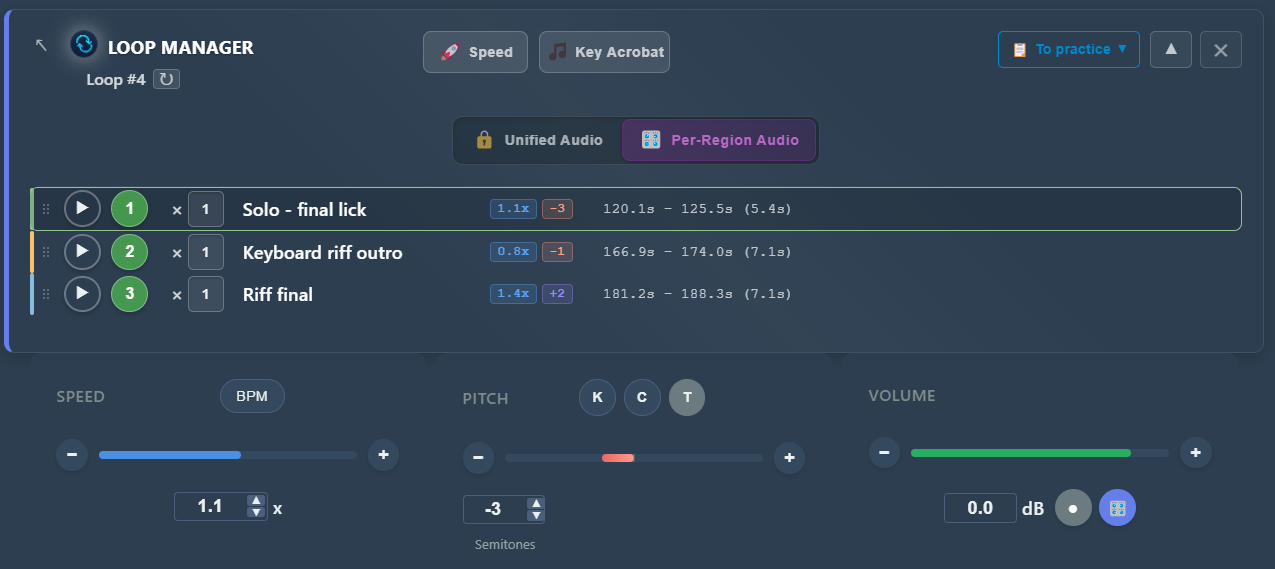
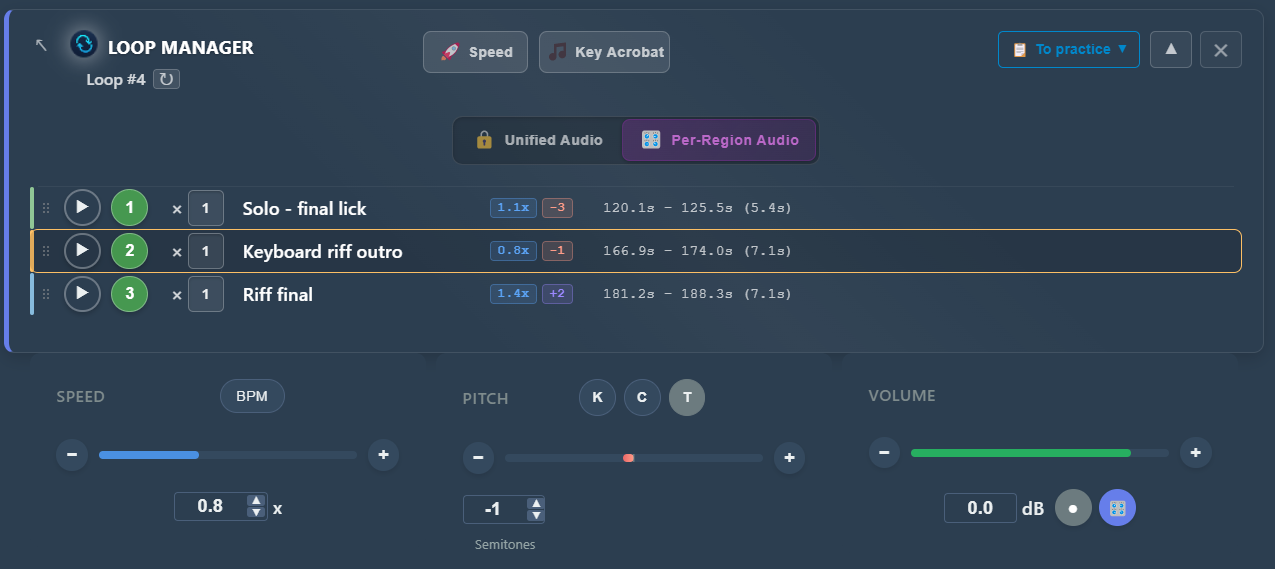
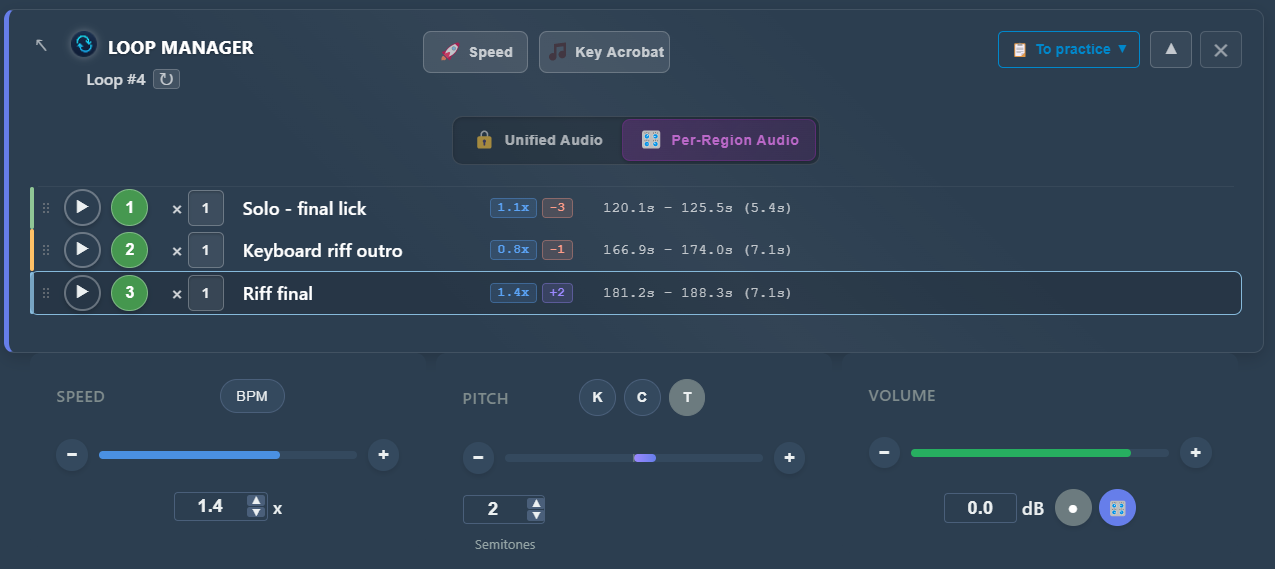
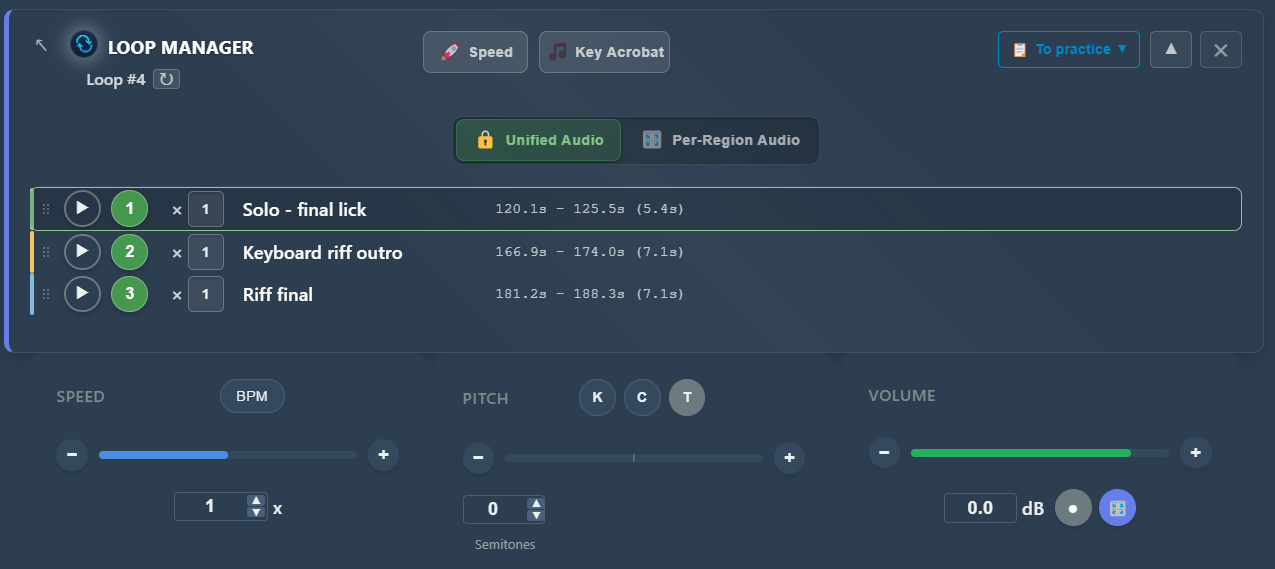
In PracticeSession, every song accumulates a permanent practice setup: unlimited named regions grouped however you like ("to practice", "mastered", "solo sections"), each with its own speed and pitch settings that load the moment you return to it. Song Master has looping and a notes track, but its loops don't carry their own settings, and there's no equivalent of chaining regions into a sequence.
That chaining is what the Loop Manager is for, and it's worth being precise about why it matters. The instinctive way to attack a hard song is to hammer one trouble spot until it's clean, then move to the next, then the next: AA-BB-CC. The research on practice scheduling says the version that actually sticks is the one that keeps coming back, ABC-ABC, because every repetition then starts by re-entering the passage cold instead of coasting on a warmed-up one, and re-entering is the part a performance will test. (I went through the evidence in how to structure a practice session.) A loop sequence is that schedule made automatic: drop the three passages you're currently working on into one sequence, each at its own tempo, press play, and the rotation runs itself while your hands stay on the instrument. Six months later, it's all still there, exactly as you left it.
The practice management layer
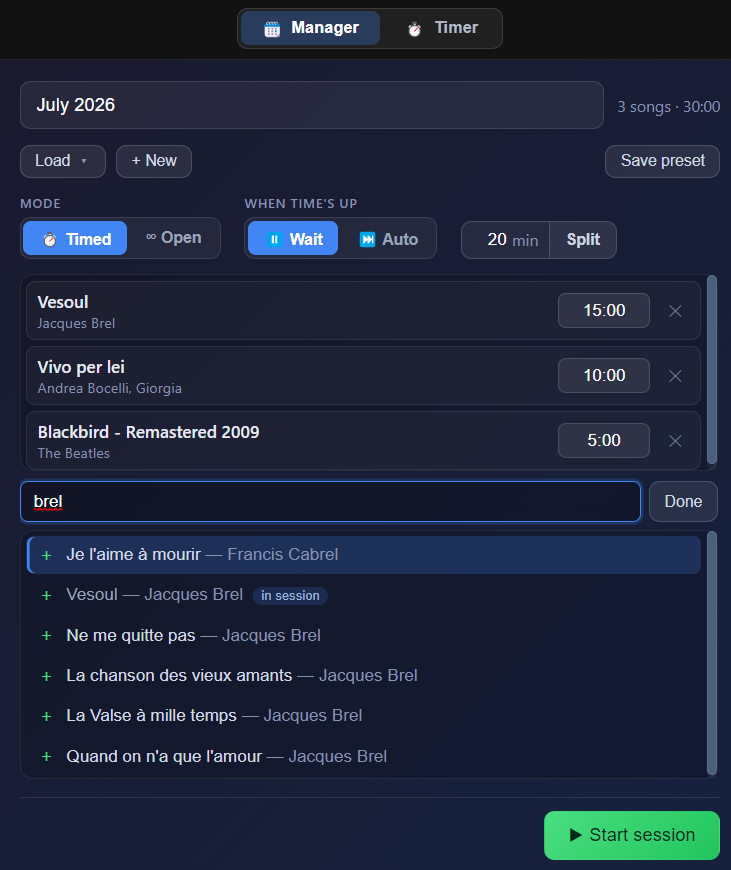
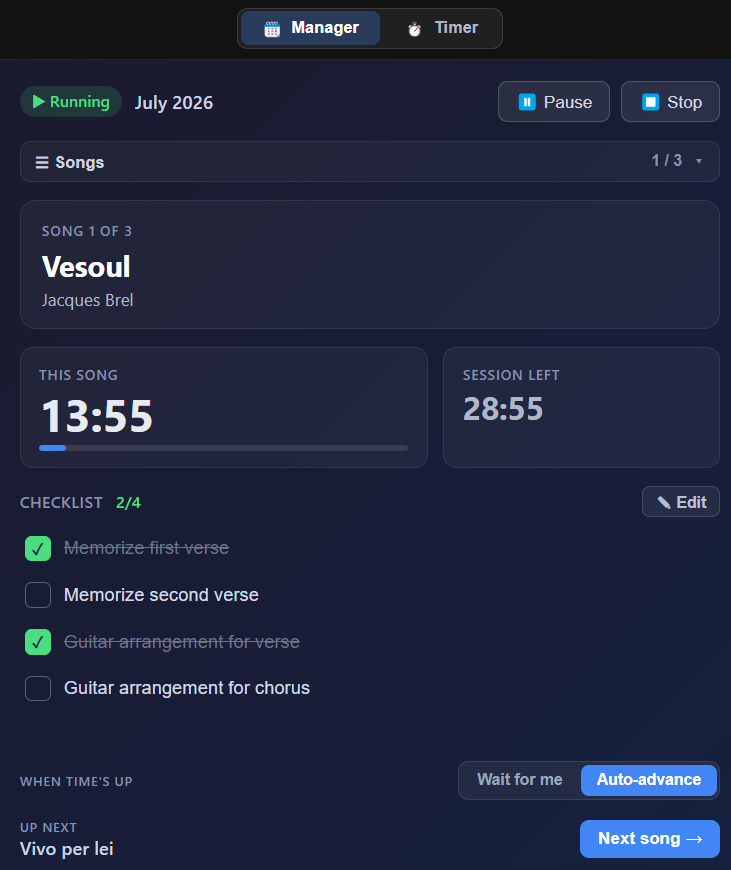
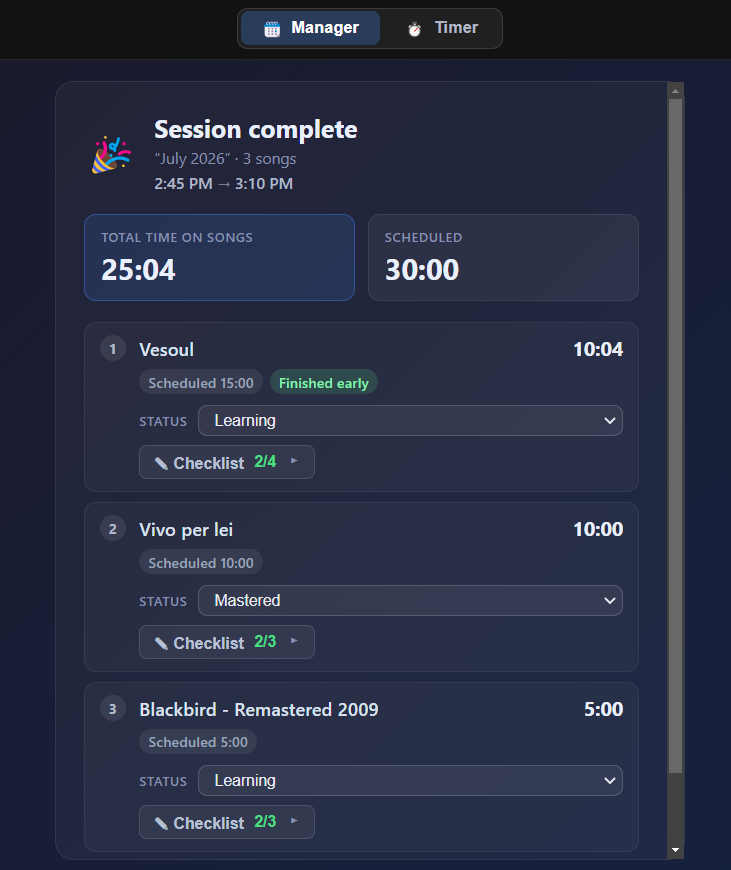
This is the part of PracticeSession that has no counterpart anywhere in Song Master (or, frankly, in any other app in this category). Practice Manager turns your library into structured, timed sessions: build a queue of songs, give each a time budget, attach checklists and notes, get a chime or auto-advance when time's up, and finish with a session recap. If your practice problem isn't "what are the chords?" but "I have 45 minutes a night and five songs to have ready by next weekend," this is the tool for it.
From practice to the gig
Setlists take the same library and turn it into gig materials: ordered sets with per-song performance notes, exported as an interactive self-contained HTML viewer (open it on any tablet), a bookmarked PDF, or straight to a printer. Song Master's playlists can order songs for a performance, but there's no export, no performance notes view, nothing designed to leave the app and follow you on stage.
Notation you can practice with, not just export
The two apps point notation in opposite directions. Song Master Pro produces notation (MIDI to MusicXML) for use in other software. PracticeSession consumes notation: load a Guitar Pro or MusicXML file and it displays in sync with the audio, cursor following playback, bar grid overlaid on the waveform, and song sections convertible into practice regions in one click. If you practice from tabs and scores, syncing them to the recording is the killer feature; Song Master doesn't display tabs at all.
Chords you write, own, and take to the gig
Song Master detects chords and asks you to correct them. PracticeSession comes at the same problem from the other side: it assumes you (or a chart you found) know what the chords are, and it makes capturing, fixing, and using them as fast as possible.
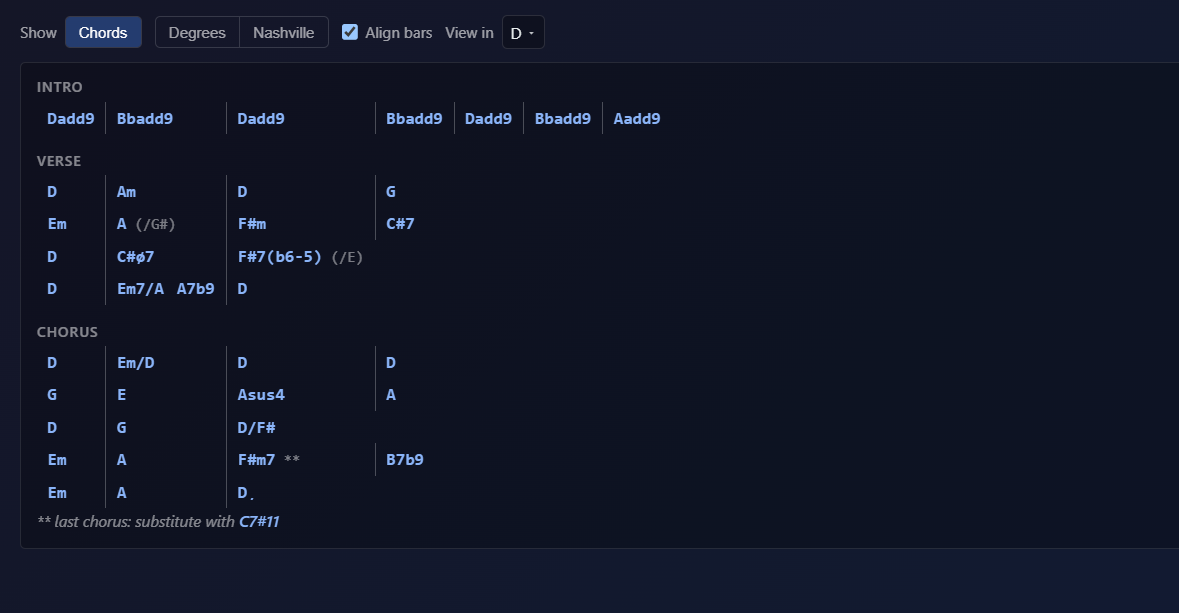
You can type a chord chart straight in, or import one: ChordPro files, and the chords-over-lyrics format you get from Ultimate Guitar. Imported charts stay fully editable, which matters more than it sounds, because community charts are frequently wrong in small ways and the fix should take seconds, not a rewrite. If Ultimate Guitar is where your charts come from, the Ultimate Guitar alternative guide walks through the import and what a Pro subscription is still worth paying for. From there the chart is yours to reshape. View it as chord names, as scale degrees, or as Nashville numbers. Transpose the whole song instantly, with enharmonic spelling that respects the key you landed in rather than dumping a chart full of accidentals on you. Merge the chords with time-stamped lyrics so the words and the changes scroll together. Then push the result into a setlist export, so the chart you practiced from is the same chart on the music stand at the gig.
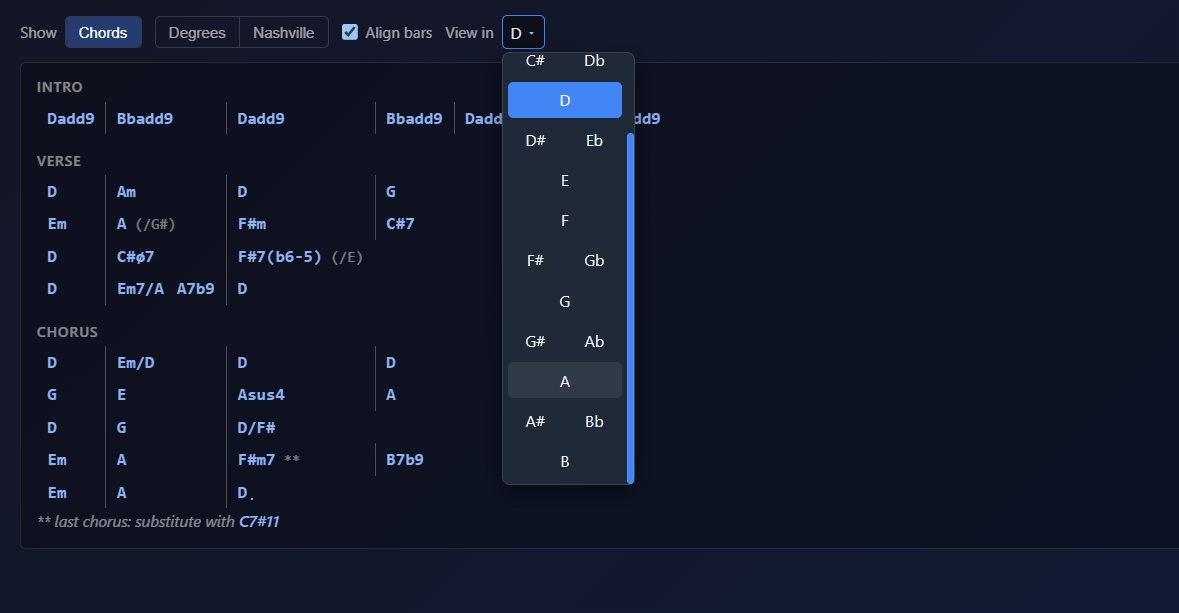
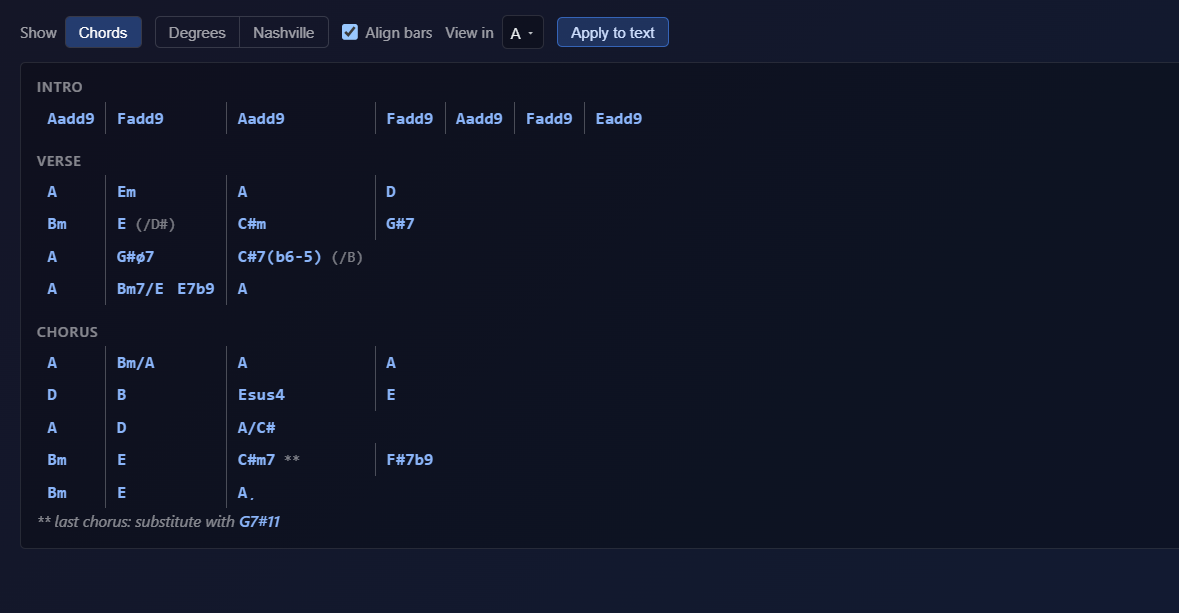
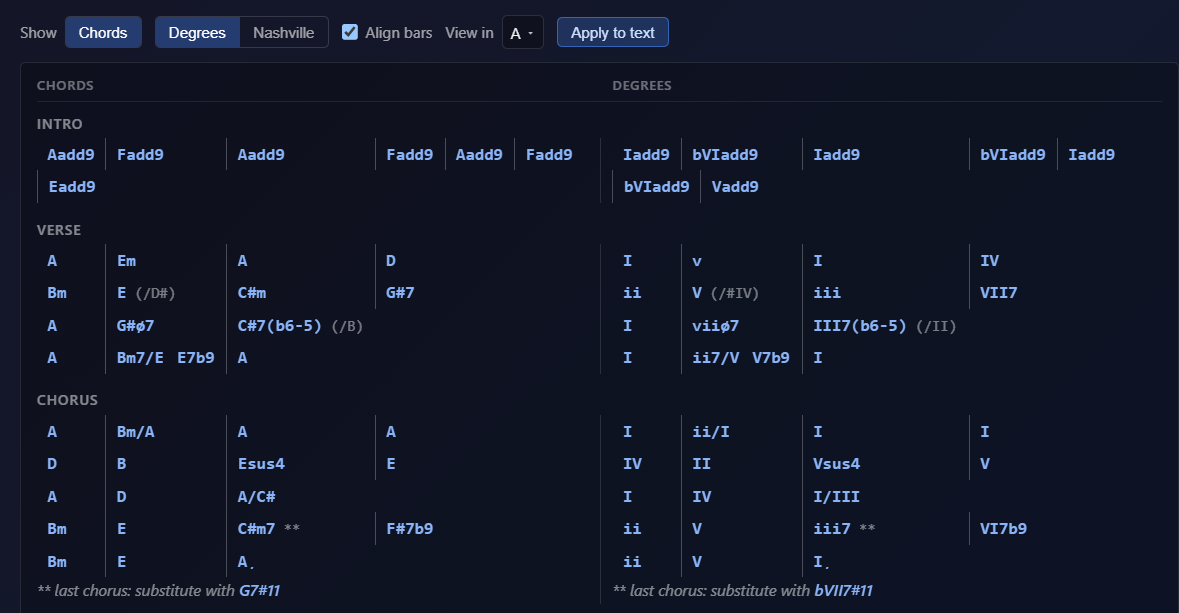
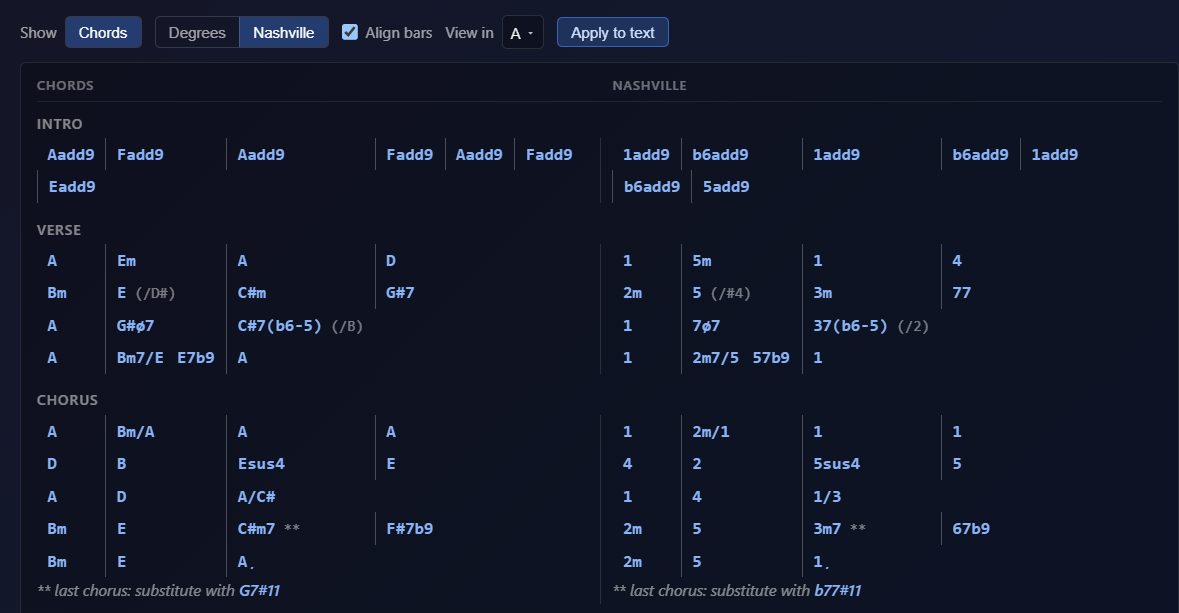
There's a case for working this way even once detection exists. Detection on any platform produces a draft that needs review, and the reviewing is not free: you still have to listen critically to every bar to know whether the machine got it right. Plenty of players would rather spend that same attention working the changes out themselves, because that listening is the ear training, and then keep the chart they trust. PracticeSession is built for those players. If you'd rather have the first draft handed to you, that's Song Master's job, and it does it well.
Surgical, cheaper stem separation
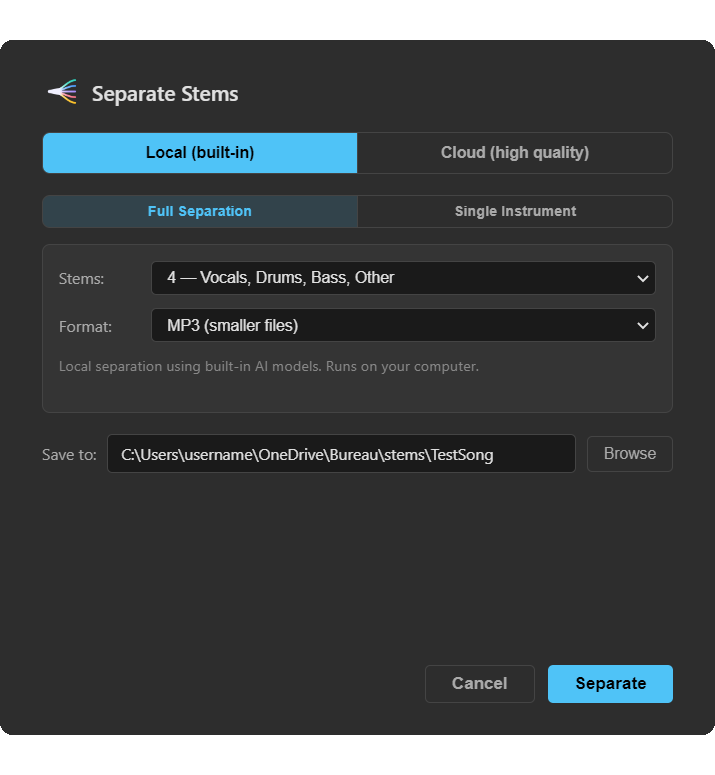
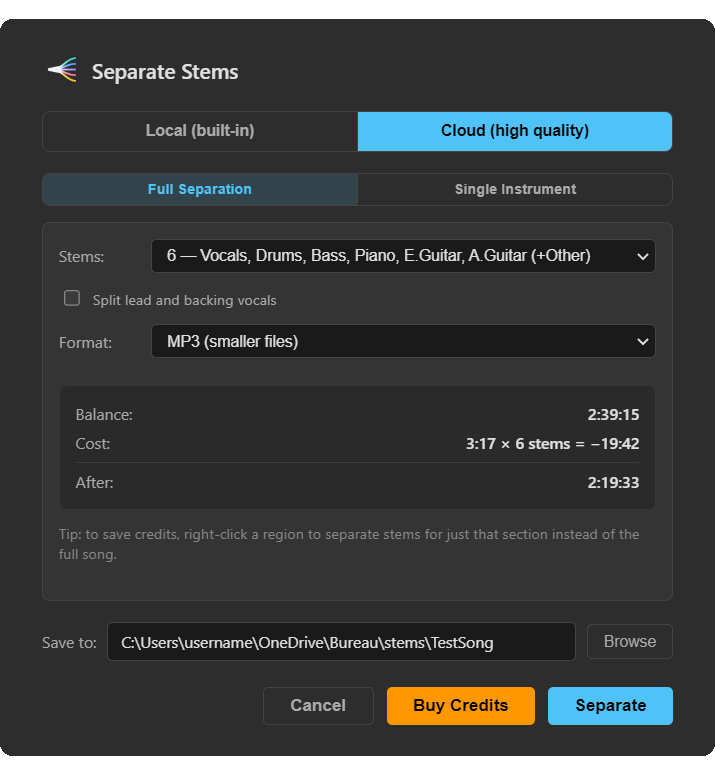
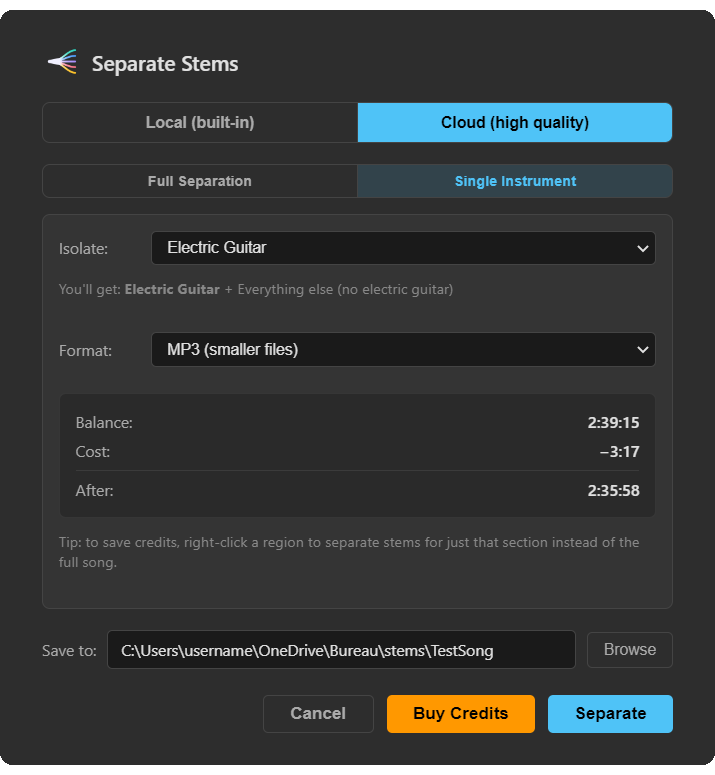
Both apps separate stems; PracticeSession splits the job across two engines. The local one is free and unlimited: 2 stems (vocals and instrumental) or 4 (vocals, bass, drums, other). The cloud one is higher quality and priced in credits: 4 or 6 stems, or point its 2-stem mode at any one of nine instruments and get that part plus a backing track without it, for 1x the duration in credits, a fraction of what a full multi-stem split costs. Either engine will work on a drag-selected passage instead of the whole song. Song Master does 4 stems locally, 6 in Pro, always the full track. If what you need is "just the bass, just this section," that's the difference, and in cloud mode it often costs pennies per passage. (For how both compare against the dedicated services, see the stem separation roundup.)
Sync, Linux, tutorials, and the price
The rest of the ledger: PracticeSession runs on Linux (Song Master doesn't), syncs your library across devices (Song Master moves projects by hand in folders), teaches itself with interactive step-by-step tutorials (Song Master points you to YouTube), and costs $39 against $79.95, or $139.95 for the Pro features. You could buy PracticeSession and Song Master Standard together for less than Song Master Pro alone. Which, as we'll see, is not an absurd idea.
One caveat on that $39: it's an introductory price rather than a settled one, and as the app fills out it's likelier to move up than down. Because all 1.x updates are free, buying at the current number is the cheaper side of that bet. There's no countdown timer attached; you just deserve to know it while you compare.
Pricing, Trials, and the Fine Print
| PracticeSession | Song Master 5 | |
|---|---|---|
| Price | $39 (introductory, expected to rise) | $79.95 / $139.95 (Pro) |
| Trial | 14 days, everything unlocked, no credit card | Full program, but 15-minute sessions and no saving |
| Updates | All 1.x updates free; discount planned for 2.0 | Free updates 2020-2025; v5 is a paid upgrade (price shown at checkout for owners) |
| Optional services | Cloud separation credits ($3.99-$15.99, never expire); Sync Plus $9.99/yr | None (all local) |
Both apps sell the same promise: pay once, own it. Worth knowing when budgeting: Song Master's July 2026 release broke its own free-update streak. Every update from 2020 through early 2025 was free; version 5 is the first paid upgrade, and the upgrade price is only visible to logged-in owners at checkout. That's a normal way to fund development (and after roughly 17 months without a public release, v5 is a big one), but if "one-time purchase" is why you're here, factor in that major versions may cost again. PracticeSession's current policy is that all 1.x updates are free, with a discount planned on an eventual 2.0.
The trials differ more than they look. Song Master's demo never expires but limits you to 15-minute sessions and won't save your work, so you can't experience the thing that matters most about practice software: coming back the next day to a setup that remembered everything. PracticeSession's 14-day trial is the full app, precisely so you can test that.
Which Should You Choose?
| Your Situation | Recommendation |
|---|---|
| You mainly figure out songs and want chords/key/structure detected for you | Song Master: the analysis engine is the best in this class |
| You keep your own chord charts, or import and fix them, and want them transposed and printed for the gig | PracticeSession: ChordPro and Ultimate Guitar import, degree and Nashville views, chords in setlist exports |
| You want recording-to-notation transcription (audio to MIDI to MusicXML) | Song Master Pro: nothing in PracticeSession does this |
| You practice from Guitar Pro tabs or scores synced to the audio | PracticeSession: Song Master doesn't display notation |
| You maintain a repertoire and want structured, timed practice sessions | PracticeSession: Practice Manager has no equivalent |
| You gig and want setlists, performance notes, and stage-ready exports | PracticeSession: setlist exports (HTML/PDF/print) |
| You practice on more than one computer | PracticeSession: cloud sync; Song Master is manual folders |
| You're on Linux | PracticeSession: Song Master is Windows/Mac only |
| Everything must run offline, including your best-quality stems | Song Master: all local; PracticeSession's top-quality separation is cloud-based |
| Budget is tight | PracticeSession: $39 vs $79.95, and the trial is the full app |
The Conclusion: They're Almost Complementary
Most comparisons in this space are between apps fighting over the same job. This one isn't, quite. Song Master's best features end where PracticeSession's begin: Song Master tells you what a song is made of; PracticeSession runs the weeks of practice that follow and gets the result onto a stage. A serious transcriber-gigger could justify owning both for less than the price of some competitors' annual subscriptions.
If you only pick one: choose by your bottleneck. If your practice time disappears into working out chords and structures by ear, Song Master attacks exactly that. If your bottleneck is everything else (organizing what to practice, keeping section setups, drilling trouble spots at rising tempos, prepping gigs, moving between machines), that's the job PracticeSession was built for, at half the price.
Try PracticeSession Free
14-day trial with all features unlocked. No credit card required. See whether the practice-workflow side of this comparison fits how you actually work.
Download Free TrialNote: I've done my best to represent Song Master accurately, based on its documentation, its v5 release notes, and long-running user discussions, as of July 2026. I build PracticeSession, so read my judgments with that in mind, and if you spot an error, please let me know so I can correct it.
Frequently Asked Questions
What's the best Song Master alternative?
It depends which part of Song Master you're replacing. For the chord, key, and section detection specifically, no desktop app at this price does it as well, so the honest answer is often "nothing yet." For everything built around the analysis, meaning organizing what you practice, keeping per-section setups, prepping gigs, working across machines, or running on Linux, PracticeSession covers that ground at $39, and its trial is the full app rather than 15-minute sessions. Capo detects chords too but is Apple-only and subscription-based, and Chordify is a web subscription.
Is Song Master a good Moises alternative?
For desktop users tired of subscriptions, yes. Song Master is one-time purchase with local stem separation, and its chord/beat analysis goes beyond what Moises offers. It has no mobile app, though. PracticeSession is the other desktop one-time option, with free local separation plus pay-per-use cloud separation instead of a subscription, and it also has a phone app for Android and iPhone that shares the same library.
Does PracticeSession detect chords like Song Master?
Not yet. PracticeSession doesn't currently analyze audio to detect chords, beats, or song structure; that's Song Master's specialty. Chord detection is in development. What PracticeSession has today is the chart side: type chords in or import them from ChordPro and Ultimate Guitar files, edit them freely, view them as chord names, scale degrees, or Nashville numbers, transpose the whole song instantly, merge them with time-stamped lyrics, and carry them through into setlist exports. Detection saves you the first pass; the chart tools are what you live with afterwards.
Is Song Master Pro worth the extra $60?
The Pro tier adds audio-to-MIDI transcription, the MIDI editor, notation export (MusicXML/PDF), 6-stem separation (guitar and piano stems), and MIDI/OSC rig control. If you transcribe to notation or drive playback from a pedalboard, that's your $60. If you mainly learn and practice songs, Standard covers it.
Can I run Song Master on Linux?
No. Song Master supports Windows and macOS. On Linux, the practical one-time-purchase options are PracticeSession and Transcribe!.